글로벌 서비스를 운영하다 보면 배치는 “그냥 주기적으로 도는 작업”이 아니라, 국가별 운영 정책을 따라야 하는 작업이 된다. 예를 들어 어떤 국가는 업무 시간에는 배치를 돌리면 안 되고(트래픽/CS 이슈), 어떤 국가는 새벽에만 몰아서 처리해도 괜찮다.
그래서 요구사항은 단순했다.
- 국가/서비스별로 “실행을 지연(=제외)해야 하는 시간 구간”이 있고
- 이 정책은 운영 중에도 자주 바뀐다 (배포 없이 바꾸고 싶다)
결론은 하드코딩이 아니라 DB로 관리하자였다.
참고: 현재 서비스 대상국인 한국(Asia/Seoul)과 인도(Asia/Kolkata) 모두 DST(Daylight Saving Time)를 사용하지 않아 연중 고정 오프셋을 유지한다. 따라서 이 구현에서는 DST 전환에 따른 복잡한 처리는 고려하지 않았다.
DB 모델링
제외 시간 구간 + 실행 시각 + 타임존 정책을 관리하기 위해 다음 테이블을 만들었다.
delay_start_time ~ delay_end_time: 배치를 “지연/제외”할 시간 구간execute_time: 제외 시간이 끝나면 언제 실행할지timezone: 국가 기준 타임존 (예:Asia/Kolkata)regist_date: 등록 시각(기록용)
CREATE TABLE `t_delay_execute_job_schedule` (

  ...

  `delay_start_time` time NOT NULL COMMENT '지연 시작 시간',
  `delay_end_time` time NOT NULL COMMENT '지연 끝 시간',
  `execute_time` time NOT NULL COMMENT '지연된 작업 실행 시간',
  `timezone` varchar(50) NOT NULL COMMENT '타임존',
  `regist_date` datetime NOT NULL DEFAULT CURRENT_TIMESTAMP COMMENT '등록날짜',

  ...

);
sql
엔티티는 LocalTime으로 매핑했다.
@Column(name = "delay_start_time")
private LocalTime delayStartTime;

@Column(name = "delay_end_time")
private LocalTime delayEndTime;

@Column(name = "execute_time")
private LocalTime executeTime;
java
위 테이블을 활용해서 스케줄러 실행 시점에 해당 Job이 실행지연 설정 되어있는지 확인하고, 통과 시에만 스케줄러가 돌 수 있게 설정했다.
// 실행 시간이 지연 구간인지 확인하는 메서드
private boolean isPendingJob(..., ZonedDateTime executeTime) {
    DelayExecuteJobSchedule schedule = 지연 스케줄 조회;

    // 스케줄에 저장된 타임존 기준으로 시간 변환
    ZoneId scheduleZoneId = ZoneId.of(schedule.getTimezone());
    ZonedDateTime executeInScheduleZone = executeTime.withZoneSameInstant(scheduleZoneId);

    LocalTime target = executeInScheduleZone.toLocalTime();
    LocalTime startTime = schedule.getDelayStartTime();
    LocalTime endTime = schedule.getDelayEndTime();

    boolean inRange;

    // 1) 일반 구간: 예) 02:00 ~ 08:00
    if (startTime.isBefore(endTime)) {
        // startTime <= target <= endTime
        inRange = !target.isBefore(startTime) && !target.isAfter(endTime);
    }
    // 2) 자정 넘는 구간: 예) 22:00 ~ 02:00
    else {
        // target >= startTime  OR  target <= endTime
        inRange = !target.isBefore(startTime) || !target.isAfter(endTime);
    }

    return inRange;
}
java
기대했던 동작
- 스케줄러는 언제나 “UTC 기준 현재 시각”으로 돌고
- 각 국가별 정책은
timezone컬럼(예:Asia/Kolkata)을 기준으로 변환한 뒤 - 그 나라의 LocalTime으로
delay_start_time ~ delay_end_time구간을 판단한다
즉, 인도(Asia/Kolkata) 기준으로 02:00 ~ 08:00은 무조건 지연시키고, 08:00에 실행시키는 그림이었다.
DB에는 02:00, 애플리케이션에서는 17:00..?
문제는 아주 이상한 형태로 나타났다.
DB에 저장된 값은 분명 이랬다.

delay_start_time = 02:00:00delay_end_time = 08:00:00execute_time = 08:00:00
그런데 JPA로 조회해서 엔티티로 바인딩되면 다음처럼 9시간 밀린 값(-9) 이 들어왔다.
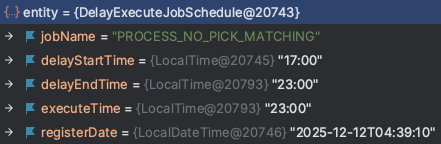
delayStartTime = 17:00:00delayEndTime = 23:00:00executeTime = 23:00:00
시간이 달라져서 isPendingJob() 로직이 완전히 다른 의미가 되어버렸다.
“인도 새벽 2시 ~ 8시 지연” 정책을 만들었는데, 애플리케이션은 “전날 17시 ~ 23시 지연”처럼 인식해버린 셈이다.
- 내 PC(로컬): OS 타임존 KST(Asia/Seoul)
- 애플리케이션: JVM 타임존을 코드로 UTC로 바꾸는 설정이 있음(
@PostConstruct) - 접속 DB: DEV MySQL (서버/세션 기준 UTC)
디버깅
Hibernate 추출 로그에서 이미 TIME이 이미 깨짐.
Hibernate TRACE 로그를 켜봤다.
그랬더니 엔티티에 세팅되기 전에, ResultSet에서 값을 꺼내는 시점부터 이미 깨져 있었다.
BasicExtractor : extracted value ([delay_st6_7_] : [TIME]) - [17:00]
BasicExtractor : extracted value ([delay_en5_7_] : [TIME]) - [23:00]
BasicExtractor : extracted value ([execute_7_7_] : [TIME]) - [23:00]
우리 서비스는 시간 관련하여 UTC로 통일하여 사용중이다.
애플리케이션에서 JVM 타임존 UTC로 변경 했는데?
UTC랑 9시간 차이나는 거면 내 로컬 PC의 타임존 영향을 받았나?
JVM 타임존 변경
@SpringBootApplication
public class ScheduleManagerApplication {
    public static void main(String[] args) {
        SpringApplication.run(ScheduleManagerApplication.class, args);
    }

    @PostConstruct
    public void initTimezone() {
        // JVM 타임존 설정
        TimeZone.setDefault(TimeZone.getTimeZone("UTC"));
    }
}
java
MySQL 세션 타임존 변수 확인.
try (Connection conn = dataSource.getConnection();
     PreparedStatement stmt = conn.prepareStatement(
        "SELECT @@global.time_zone, @@session.time_zone, @@system_time_zone"
     )) {
    log.info("Default JVM TimeZone : {}", TimeZone.getDefault().getID());
    ResultSet rs = stmt.executeQuery();
    if (rs.next()) {
        log.info("Global Timezone      : {}", rs.getString(1));
        log.info("Session Timezone     : {}", rs.getString(2));
        log.info("System Timezone      : {}", rs.getString(3));
    }
} catch (Exception e) {
    e.printStackTrace();
}
java
Default JVM TimeZone : UTC
Global Timezone : SYSTEM
Session Timezone : SYSTEM
System Timezone : UTC
SYSTEM은 “MySQL이 OS 타임존을 따라간다”는 의미이고, OS가 UTC라서 세션도 사실상 UTC였다.
그런데 왜 LocalTime만 바뀌어?
중요한 컬럼은 아니고 기록용이긴 했지만 LocalDateTime(regist_date)은 시간 변경 없이 그대로 바인딩 되었다.
MySQL Connector/J 드라이버의 소스 코드를 살펴봤다.
com.mysql.cj.jdbc.result.ResultSetImpl
public class ResultSetImpl extends NativeResultset implements ResultSetInternalMethods, WarningListener {
    public ResultSetImpl(ResultsetRows tuples, JdbcConnection conn, StatementImpl creatorStmt) throws SQLException {
        this.session = (NativeSession) conn.getSession();

        PropertySet pset = this.connection.getPropertySet();

        this.defaultTimeValueFactory = new SqlTimeValueFactory(
            pset, null, this.session.getServerSession().getDefaultTimeZone(), this
        );
        this.defaultTimestampValueFactory = new SqlTimestampValueFactory(
            pset, null,
            this.session.getServerSession().getDefaultTimeZone(),
            this.session.getServerSession().getSessionTimeZone()
        );
    }
    ...

    // LocalTime 값 바인딩 하는 부분
    @Override
    public Time getTime(int columnIndex) throws SQLException {
        checkRowPos();
        checkColumnBounds(columnIndex);
        return this.thisRow.getValue(columnIndex - 1, this.defaultTimeValueFactory);
    }

    // LocalDateTime 값 바인딩 하는 부분
    @Override
    public Timestamp getTimestamp(int columnIndex) throws SQLException {
        checkRowPos();
        checkColumnBounds(columnIndex);
        return this.thisRow.getValue(columnIndex - 1, this.defaultTimestampValueFactory);
    }
}
java
여기서 getTime()과 getTimestamp()가 각각 LocalTime, LocalDateTime 값을 꺼내는 부분이다.
getTime()은SqlTimeValueFactory를 쓰고getTimestamp()은SqlTimestampValueFactory를 쓴다.
두 팩토리 모두 생성자에서 this.session.getServerSession().getDefaultTimeZone()를 호출해서 타임존 정보를 받아온다.
com.mysql.cj.protocol.a.NativeServerSession
이 메서드가 (설정에 따라) 캐시된 타임존을 쓰거나, 아니면 TimeZone.getDefault()를 다시 호출해.
public class NativeServerSession implements ServerSession {
    private TimeZone sessionTimeZone = null;
    private TimeZone defaultTimeZone = TimeZone.getDefault();
    private RuntimeProperty<Boolean> cacheDefaultTimeZone = null;

    public NativeServerSession(PropertySet propertySet) {
        this.propertySet = propertySet;
        this.cacheDefaultTimeZone = this.propertySet.getBooleanProperty(PropertyKey.cacheDefaultTimeZone);
        this.serverSessionStateController = new NativeServerSessionStateController();
    }

    public TimeZone getDefaultTimeZone() {
        if (this.cacheDefaultTimeZone.getValue()) {
            return this.defaultTimeZone;
        }
        return TimeZone.getDefault();
    }
}
java
서버 기동 후 JVM 타임존을 바꿔주었기 때문에 TimeZone.getDefault()는 UTC를 반환할 줄 알았으나
실제로는 JVM 타임존 변경 이전에 드라이버가 초기화되면서 “기본 타임존”을 내부적으로 잡아버린 상태였다.

문제 해결
원인을 찾고보니 여러가지 해결 방법이 있었다.
1. JVM 옵션으로 -Duser.timezone="UTC"를 주어서 JVM 시작부터 UTC로 고정
java -Duser.timezone="UTC" -jar app.jar
2. TimeZone.setDefault(UTC) 적용 시점을 main()으로 당기기
@PostConstruct에서 설정하던 타임존 설정을 가장 이른 시점으로 당김.
@SpringBootApplication
public class ScheduleManagerApplication {
    public static void main(String[] args) {
        TimeZone.setDefault(TimeZone.getTimeZone("UTC"));
        SpringApplication.run(ScheduleManagerApplication.class, args);
    }
}
java
3. JDBC URL에 cacheDefaultTimeZone=false 추가
spring.datasource.url=jdbc:mysql://localhost:3306/db?cacheDefaultTimezone=false&serverTimezone=UTC&...
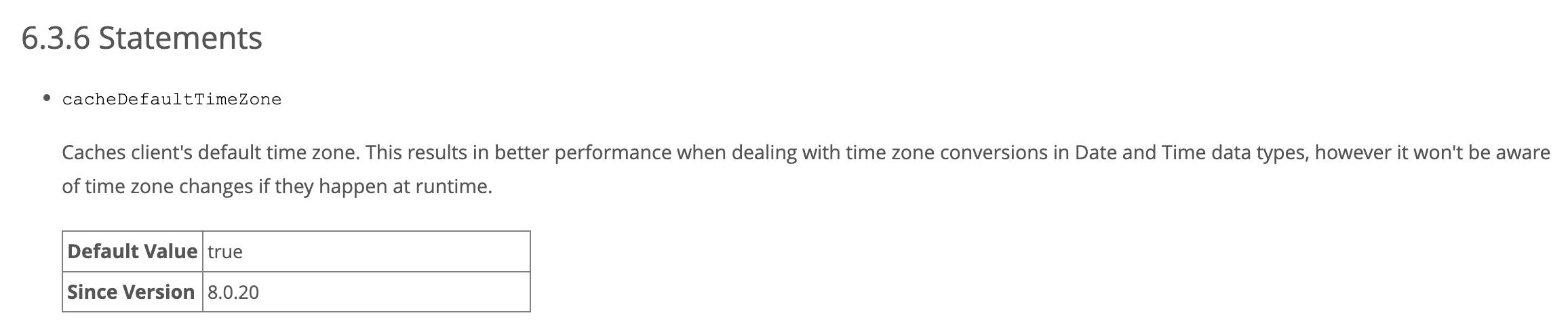
cacheDefaultTimeZone 프로퍼티 설명(공식 문서):
- “클라이언트 기본 타임존을 캐시한다”
- “대신 런타임 중 타임존 변경이 발생해도 인지 못한다”
- 기본값
true, 8.0.20부터 (dev.mysql.com)
public TimeZone getDefaultTimeZone() {
    if (this.cacheDefaultTimeZone.getValue()) {
        return this.defaultTimeZone;
    }
    return TimeZone.getDefault();
}
java
NativeServerSession 의 타임존 호출 메서드에서
cacheDefaultTimeZone이 false면 매번 TimeZone.getDefault()를 호출해서 JVM 타임존 변경을 인지하게 된다.
간단하게 적용할 수 있는 1번 방법을 선택했고, 문제는 해결되었다.
맺으면서
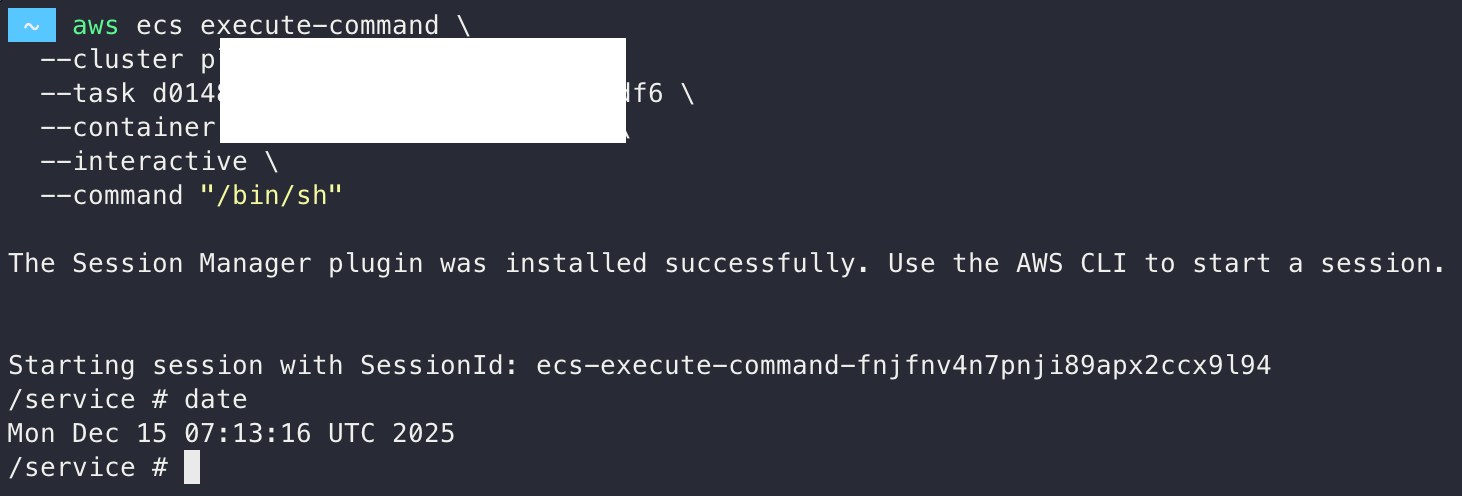
백앤드 서버의 타임존은 UTC라서 이런 오류가 발생하지 않았겠지만,
만약 서버의 OS 타임존이 KST였다면 동일한 문제가 발생했을 것 같다.
디버깅이 정말 중요하고 복잡한 문제일수록 근본 원인을 파악하는 게 중요하다는 걸 다시 한 번 느꼈다.
글로벌 서비스를 개발하고 운영하는 입장에서 타임존 이슈는 언제든지 발생할 수 있는 문제이므로,
앞으로도 시간/타임존 관련된 코드를 짤 때는 이번 경험을 떠올리며 신중하게 다뤄야겠다.